


Desktop Bargains: Where to Find the Hottest Computer Sales
Why Desktop Computer Deals Matter for Your Budget and Needs
Desktop computer deals can save you hundreds of dollars while still getting a machine that meets your needs. Here’s what you need to know right now:
Quick Guide to Desktop Computer Deals:
- Budget Range: $250–$600 for everyday use, $700+ for gaming
- Best Times to Buy: Black Friday, Cyber Monday, back-to-school season
- Where to Shop: Dell.com, HP.com, Best Buy, Amazon
- Must-Have Specs: 16GB RAM, 512GB SSD, Intel Core i5 or AMD Ryzen 5
- Form Factors: Towers (most upgradable), All-in-Ones (space-saving), Mini PCs (compact)
Finding the right desktop means balancing price with performance. You don’t need the fastest processor or the biggest hard drive—you need a computer that handles your tasks without breaking your budget. Whether you’re setting up a home office, helping kids with homework, or finally upgrading that aging tower, understanding what to look for makes all the difference.
The desktop market has shrunk over the past decade as laptops took over. But desktops still offer better value per dollar, easier upgrades, and more screen space. Plus, sales events like Cyber Monday can knock 20–63% off retail prices on quality machines.
This guide breaks down the key features to consider, shares our top picks across different categories, and shows you exactly where to find legitimate deals—not just marketing hype.
At Salt Water Promise, our community is built around a love for the coast and a lifestyle that values freedom, purpose, and conscious choices. For many of us, that lifestyle includes working remotely, running a small business from a home near the sea, or helping our kids with creative school projects. The right technology is a key part of making that life possible. While our passion is creating eco-conscious beach apparel, we know that the tools you use every day matter, too. That’s why we’ve applied our philosophy of finding sustainable value to tech, researching the best desktop computer deals to help you build a life you love, wherever you are.
Decoding the Deal: Key Features to Look for in a Budget Desktop
When we’re searching for desktop computer deals, we need to look past the flashy headlines and understand the core components that truly define a computer’s value and performance. A budget desktop doesn’t mean sacrificing capability, but it does mean being smart about where you allocate your funds.
From the generation of its processor to the type of storage it uses, every specification plays a role. We’ll also consider crucial connectivity options and the latest Wi-Fi standards to ensure your new machine integrates seamlessly into your digital life.
Understanding Core Components
The heart of any desktop computer lies in its core components. These are the workhorses that determine how smoothly your machine runs, how quickly it responds, and what tasks it can handle.
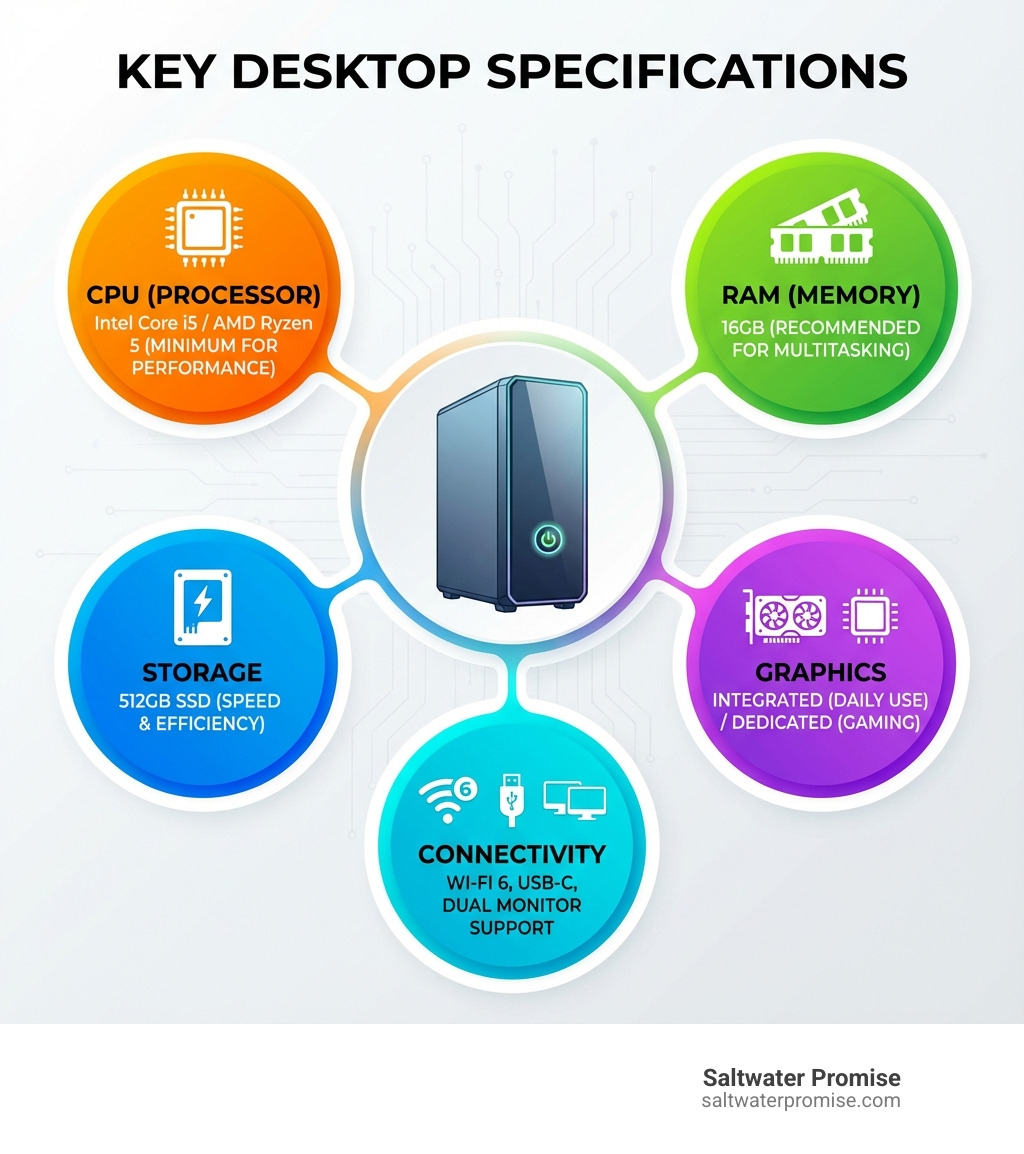
CPU (Processor): This is the brain of your computer. For budget desktops, you’ll typically encounter Intel Core series (i3, i5, i7) or AMD Ryzen series (Ryzen 3, Ryzen 5, Ryzen 7). An Intel Core i5 or AMD Ryzen 5 is generally a sweet spot for a good balance of price and performance, capable of handling most everyday tasks with ease. We’ve seen models like the Acer Aspire TC-1775-UR11 featuring a 14th Gen Intel chip, offering solid everyday performance. For mini PCs, it’s common to find mobile processors (with suffixes like ‘H’, ‘HS’, ‘HX’, or ‘U’) which are designed for efficiency and can still deliver potent productivity.
RAM (Memory): Think of RAM as your computer’s short-term memory. The more RAM you have, the more applications you can run simultaneously without slowdowns. For a budget Windows PC, a minimum of 8GB of RAM is essential; we strongly advise against anything with only 4GB. For smoother multitasking and a better overall experience, especially if you juggle many browser tabs or light photo editing, 16GB of RAM is highly recommended. The Apple Mac Mini (2024) entry-level model, for example, offers a robust 16GB of memory in its base configuration, a significant upgrade from previous generations.
Storage: This is where your operating system, programs, and files live.
- SSD (Solid State Drive): For speed and responsiveness, an SSD is non-negotiable in today’s market. They allow for lightning-fast boot times and quicker application loading. For general use, a 512GB SSD is usually sufficient.
- HDD (Hard Disk Drive): While cheaper for large capacities, HDDs are significantly slower and less reliable than SSDs. They are rarely found as primary drives in new budget desktops but might appear as secondary storage in larger towers.
- For gaming systems, we recommend at least a 1TB SSD to accommodate large game files. Be cautious of very cheap systems that might use non-upgradable, soldered-down eMMC storage.
Graphics: This component handles everything you see on your screen.
- Integrated Graphics: Most budget desktops come with integrated graphics (e.g., Intel UHD Graphics, AMD Radeon Graphics). These are built into the CPU and are perfectly adequate for everyday tasks like web browsing, video streaming, office applications, and even some light photo editing. They are not designed for demanding gaming or professional 3D rendering.
- Dedicated Graphics: If gaming or heavier creative work is on your agenda, you’ll need a dedicated graphics card (e.g., NVIDIA GeForce RTX or AMD Radeon RX series). Even entry-level dedicated cards can make a huge difference. The Asus TUF Gaming T500, for instance, uses an Nvidia GeForce RTX 5060 Ti graphics card, delivering steady 1080p gaming performance.
Choosing Your Form Factor
The physical size and design of your desktop, or its form factor, can greatly influence its price, performance, and how it fits into your space. Let’s compare the most common types:
| Feature | Tower PCs | All-in-One (AIO) PCs | Mini PCs |
|---|---|---|---|
| Price | Generally good value, wide range | Mid-to-high for integrated display | Often excellent value, very budget-friendly |
| Performance | Highest potential, especially for gaming | Good for everyday/office, some mid-range options | Good for productivity, some entry-level gaming |
| Upgradability | Best (RAM, storage, GPU, CPU) | Limited (RAM, storage), GPU usually not possible | Limited (RAM, storage), GPU usually not possible |
| Footprint | Largest, takes up desk or floor space | Moderate, integrated into monitor | Smallest, often fits in palm of hand or VESA-mounted |
- Tower PCs: These are the traditional desktops, offering the most flexibility for upgrades and powerful components. The Acer Aspire TC-1775-UR11 is a good example of a budget tower for general use. For gamers, models like the Asus TUF Gaming T500 demonstrate how a compact tower can still deliver.
- All-in-One (AIO) PCs: These integrate the computer components directly into the monitor, offering a sleek, clutter-free setup. The Dell 24 All-in-One (EC24250) is praised for its compact design and capable performance, ideal for a home office. Apple’s iMac is another well-known AIO, offering a premium experience.
- Mini PCs: As their name suggests, these are incredibly compact, often no larger than a small book. They are perfect for tight spaces or for those who want a computer that can be hidden away. The Geekom A6 Mini and Asus NUC 15 Pro+ are excellent examples, packing competitive performance and a generous number of ports into tiny designs. The Raspberry Pi 5 is an even smaller, more niche option for tinkerers.
Don’t Forget Connectivity
Connectivity is key to a smooth computing experience. Modern budget desktops offer a range of ports and wireless standards that improve usability.
- USB-C & Thunderbolt 4: These versatile ports offer fast data transfer, video output, and power delivery. Thunderbolt 4, found on systems like the Asus NUC 15 Pro+, offers even greater bandwidth for external devices.
- Wi-Fi 6E & Wi-Fi 7: For fast and reliable wireless internet, look for desktops supporting Wi-Fi 6E or the even newer Wi-Fi 7. The Acer Aspire TC-1775-UR11 includes Wi-Fi 6E, ensuring excellent wireless performance.
- Dual Monitor Support: Many budget desktops, even those with integrated graphics, can support two monitors, significantly boosting productivity. Models like the Acer Aspire TC-1775-UR11 often come with dual HDMI ports, making this easy.
- DisplayPort: Another common video output, often found alongside HDMI, offering high-resolution and high-refresh-rate capabilities.
Our Top Picks for Desktop Computer Deals by Category
Finding the perfect desktop is often about matching the machine to your specific needs. We’ve scoured the market to highlight some of the best desktop computer deals currently available, categorized by how you’ll use them.

Whether you’re managing household tasks, conquering virtual worlds, or running a business, there’s a budget desktop out there for you.
The Everyday Powerhouse: Best for Family and Home Office
For most users, a reliable desktop that can handle daily tasks like web browsing, email, streaming videos, and schoolwork is paramount. These machines offer a great balance of performance and affordability.
- What to look for: A modern Intel Core i5 or AMD Ryzen 5 processor (13th or 14th Gen Intel, or equivalent Ryzen), 16GB of DDR4 or DDR5 RAM, and at least a 512GB SSD. Good connectivity, including Wi-Fi 6 or 6E, and multiple USB ports, is also important.
- Our pick: The Acer Aspire TC-1775-UR11 stands out here. It offers good value with a 14th Gen Intel chip, dual HDMI ports for easy dual monitor setup, Wi-Fi 6E for fast wireless, and a convenient front-facing card reader. It’s a suitable fit for everyday use and can often be found around the $500 mark.
The Space-Saving All-in-One
All-in-One (AIO) PCs are perfect for those who prioritize a clean, minimalist workspace. They integrate all computer components into the monitor, reducing cable clutter and saving space.
- What to look for: A large, clear display (24-inch or more with FHD resolution), decent integrated webcam, and included wireless peripherals.
- Our pick: The Dell 24 All-in-One (EC24250) is a sleek, compact, and capable system. It features a large screen, a better-than-average pop-up webcam for video calls, and comes with wireless peripherals, making it ideal for a home office or living room. We’ve seen this model available for around $500, down from a typical price of over $1,000. For those in the Apple ecosystem, the Apple iMac M4 offers a premium AIO experience with its stunning Liquid Retina display and powerful M4 chip, though its price point is higher.
The Mighty Mini PC
Mini PCs pack a surprising punch for their size. They are excellent for users with limited desk space, those who want a discreet media center PC, or independent professionals needing a compact workstation.
- What to look for: A powerful mobile processor (AMD Ryzen or Intel Core Ultra), ample RAM (16GB or 32GB), and a good selection of ports.
- Our picks:
- The Geekom A6 Mini offers competitive productivity performance with an AMD Ryzen 7 6800H chip and 32GB of memory. It provides a generous number of ports in a compact design at an excellent price, often available for under $600.
- The Asus NUC 15 Pro+ is another top mini-PC pick for business use, featuring potent productivity performance, Thunderbolt 4, and Wi-Fi 7, with easily accessible memory and storage.
- The Apple Mac Mini (2024), even its entry-level model, provides robust everyday work computer performance at a price that rivals many less polished Windows machines. Its compact size and powerful M-series chip make it a fantastic option, especially if you already use other Apple devices. We’ve seen deals on the M4 Mac Mini for under $500, a significant saving.
The Entry-Level Gamer
Yes, you can find gaming performance on a budget! These desktops focus on delivering smooth 1080p gaming without breaking the bank.
- What to look for: A capable processor (even a laptop-grade one), a dedicated entry-level NVIDIA or AMD graphics card, and at least 16GB RAM with a 1TB SSD.
- Our pick: The Asus TUF Gaming T500 is an excellent example of a budget gaming desktop. It uses an Intel Core i7-13620H laptop processor combined with an Nvidia GeForce RTX 5060 Ti graphics card. This setup delivers steady 1080p gaming performance in a compact, quiet, and power-efficient package. We’ve seen it discounted from over $1,200 to under $1,000, making it a strong contender for budget-conscious gamers.
Smart Shopping Strategies: Getting the Most for Your Money
Finding great desktop computer deals isn’t just about spotting a low price; it’s about making a strategic purchase that offers long-term value. From deciding between pre-built and DIY to understanding the impact of accessories, we’ll guide you through smart shopping.
Pre-Built vs. DIY: What’s the Right Choice for Your Budget?
This is a classic debate among PC enthusiasts, and the “budget” aspect adds another layer to the decision.
- Pre-Built Desktops:
- Pros:
- Convenience: Plug-and-play ready, no assembly required.
- Warranty & Support: Typically comes with a single manufacturer warranty and customer support.
- Value: Manufacturers can often get components cheaper in bulk, leading to competitive pricing, especially during sales.
- Cons:
- Limited Customization: You’re often stuck with the configuration offered.
- Bloatware: Some pre-builts come with pre-installed software you don’t need.
- Proprietary Parts: Some budget systems may use proprietary components that limit future upgrades.
- Pros:
- Building Your Own (DIY):
- Pros:
- Full Control: You choose every single component, ensuring it perfectly matches your needs.
- Cost Savings (Potentially): If you’re savvy about deals, you can often get more performance for your money.
- Learning Experience: It’s a great way to understand how computers work.
- Upgradability: Easier to upgrade individual components down the line. The Framework Desktop is an excellent example of a highly modular system designed for user customization and repair.
- Cons:
- Time-Consuming: Researching, ordering parts, and assembly takes time.
- No Single Warranty: Each component has its own warranty, making troubleshooting more complex.
- Troubleshooting: If something goes wrong, you’re the tech support.
- Initial Cost: Sometimes, a good pre-built deal can beat the cost of individual components.
- Pros:
For most people looking for desktop computer deals, a pre-built system, especially during a sale, offers the best balance of price, convenience, and support.
Maximizing Your Savings on Desktop Computer Deals
Timing and knowing where to look are crucial for snagging the best deals.
- Holiday Sales: These are prime times for discounts. We’re talking about major events like Black Friday and Cyber Monday. Retailers like Dell and HP offer significant markdowns. For instance, we’ve seen Cyber Monday deals with savings of up to 43% off, or specific models like a Dell Tower Plus Desktop at $899.99, saving $450.
- Manufacturer Direct Deals: Keep an eye on official brand websites like Dell.com and HP.com. They often run flash sales, weekly offers, and exclusive bundles.
- Student & Professional Discounts: Many manufacturers offer special discounts for students, educators, military personnel, and first responders. While the ID.me links provided in our research were for apparel, many tech companies use similar verification services to provide specific groups with 10-20% off their purchases. It’s always worth checking if you qualify!
- Refurbished Options: Certified refurbished desktops from reputable sellers can offer excellent value. They’ve been tested and often come with a warranty, providing a budget-friendly alternative to new machines.
Factoring in the Extras: Monitors, Peripherals, and Warranties
A desktop computer is just one part of the setup. You’ll need accessories, and factor these into your overall budget.
- Monitors: A decent 1080p (1,920-by-1,080-pixel) display can be found starting just under $100. If your budget allows, upgrading to a larger size or higher resolution (like a 1440p or even 4K display) can significantly improve your experience.
- Keyboard and Mouse: Many tower-style budget PCs come with a basic keyboard and mouse included in the box, which is a nice cost-saver. However, if you plan on gaming or extensive typing, you might want to invest in more ergonomic or feature-rich options later.
- Warranties and Service Plans: Don’t overlook the importance of a good warranty or an accidental damage service plan. These can save you headaches and money down the road. We recommend understanding what’s covered. For example, you can find detailed information on what to look for in an accidental damage service contract here. These plans typically cover drops, spills, and electrical surges, but exclude theft, loss, or intentional damage.
Frequently Asked Questions about Finding a Great Deal
We know that navigating desktop computer deals can raise a lot of questions. Here, we address some of the most common inquiries to help you make an informed decision.
How much should I spend on a budget desktop?
The term “budget” can mean different things to different people, but we’ve identified some general price ranges based on performance and features:
- Sub-$300 Mini PCs: These are fantastic for basic tasks like web browsing, email, streaming, and light productivity. Models like the Beelink Mini PC, SER5 Pro 5825U (around $279) or the Beelink EQi12 Dual LAN Mini PC (around $249) offer incredible value for their size and capability.
- $400-$600 Everyday Towers & All-in-Ones: This range offers a solid step up for home office use, schoolwork, and general family computing. You’ll find machines like the Lenovo 24 23.8″ FHD All-in-One Desktop Computer (available for $499.99, typically $1,049.00) or the Acer Aspire TC-1775-UR11 (around $500-$600) here, with capable processors and sufficient RAM/storage.
- $700+ for Entry-Level Gaming & Specialized Use: If you need a bit more power for creative tasks, more intensive multitasking, or entry-level gaming, your budget will likely start here. Gaming desktops like the Asus TUF Gaming T500 (seen at $959) or more powerful mini PCs like the Geekom A6 Mini (around $579) fall into this category, offering dedicated graphics or higher-end processors.
The best price for you depends on your specific needs, but these benchmarks should give you a good starting point.
Can a budget desktop be used for video editing or graphic design?
This is where the “budget” aspect requires careful consideration.
- Limitations of Integrated Graphics: Most budget desktops rely on integrated graphics. While these are perfectly fine for viewing videos, basic photo editing, and simple graphic design tasks, they are not designed for demanding video editing (especially 4K) or complex 3D graphic design. You’ll experience slowdowns, longer rendering times, and potentially crashes.
- Importance of RAM & CPU Core Count: For any creative work, having at least 16GB of RAM is crucial, and 32GB is even better. A multi-core processor (Intel Core i7 or AMD Ryzen 7 equivalent or higher) will also significantly improve performance.
- Recommendations for Heavier Workloads: If video editing or professional graphic design is a primary use, we recommend stretching your budget for a desktop with a dedicated graphics card and a more powerful CPU. The Asus TUF Gaming T500, while considered entry-level for gaming, could handle lighter video editing tasks better than a system with only integrated graphics. For serious professionals, a workstation-class desktop, even a discounted one, would be a more appropriate investment.
For light editing and graphic design, a well-configured budget desktop can suffice, but for intensive, professional-grade work, the trade-offs in performance might become frustrating.
Where are the best places to find desktop computer deals?
We always recommend exploring a variety of sources to ensure you’re getting the best bang for your buck.
- Manufacturer Websites: Brands like Dell, HP, Apple, Lenovo, and Asus frequently have “deals” or “weekly offers” sections directly on their sites. These are often the first places to look for sales. You can check out Dell’s desktop deals page or HP’s weekly offers.
- Major Online Retailers: Amazon, Newegg, Best Buy, and Walmart are constantly competing on price. They often match or beat manufacturer deals and have dedicated “today’s deals” or “clearance” sections for desktop computers.
- Deal Aggregator Sites: While we aren’t linking to specific ones, a quick search for “tech deals” or “computer sales” can lead you to sites that compile discounts from various retailers.
- Seasonal Sales Events: As we’ve mentioned, events like Black Friday and Cyber Monday are unparalleled for deep discounts. Other good times include back-to-school season, Amazon Prime Day (if applicable), and end-of-year clearances. Keep an eye on these periods to maximize your savings.
Conclusion
Navigating desktop computer deals can feel like a treasure hunt, but with the right knowledge, we can uncover incredible value. We’ve explored the essential components to look for, compared different form factors, and highlighted our top picks for various needs. We’ve also armed you with smart shopping strategies and answered common questions to guide your purchase.
The “best” deal isn’t always the cheapest, but the one that perfectly balances your budget with your performance requirements. By making informed choices, you can find a desktop that empowers your productivity, improves your entertainment, and serves you well for years to come.
At Salt Water Promise, we believe that living consciously applies to every part of our lives—from the clothes we wear to the tools we use. Choosing a reliable, long-lasting desktop is a sustainable choice that reduces e-waste and supports your work and passions. It’s another way to build a life that’s in harmony with your values. Just as we design our apparel to last, we encourage you to invest in technology that serves you well. Wear the wave. Be the change.
Ready to make another conscious choice? Shop our latest collection and join us in protecting the coastlines, oceans, and marine life we cherish.


